Content Scheduling
Viewpoint will allow you to schedule content to appear during a specific window of time. This is particularly useful for embargoed or time sensitive content such as events.
Available From
Using the ‘Available from date’ option will allow you to publish content now, but it will remain hidden until the date and time you specify.
- Create or Curate your content as you would normally without clicking
Submit for Approval/Publish Button - Click the clock icon to the right of the
Submit for Approval/Publish Button
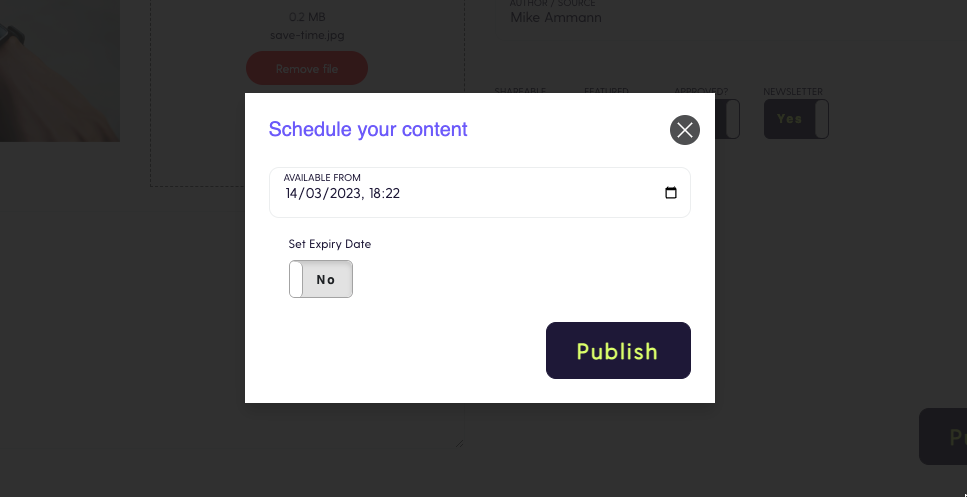
- Select the date you would like the content to be made available from
- Click
Submit for Approval/Publish
Expiry
Using the ‘Expiry date’ option will allow you to publish content now, and it will be automatically hidden from the date and time you specify.
- Create or Curate your content as you would normally without clicking
Submit for Approval/Publish Button - Click the clock icon to the right of the
Submit for Approval/Publish Button
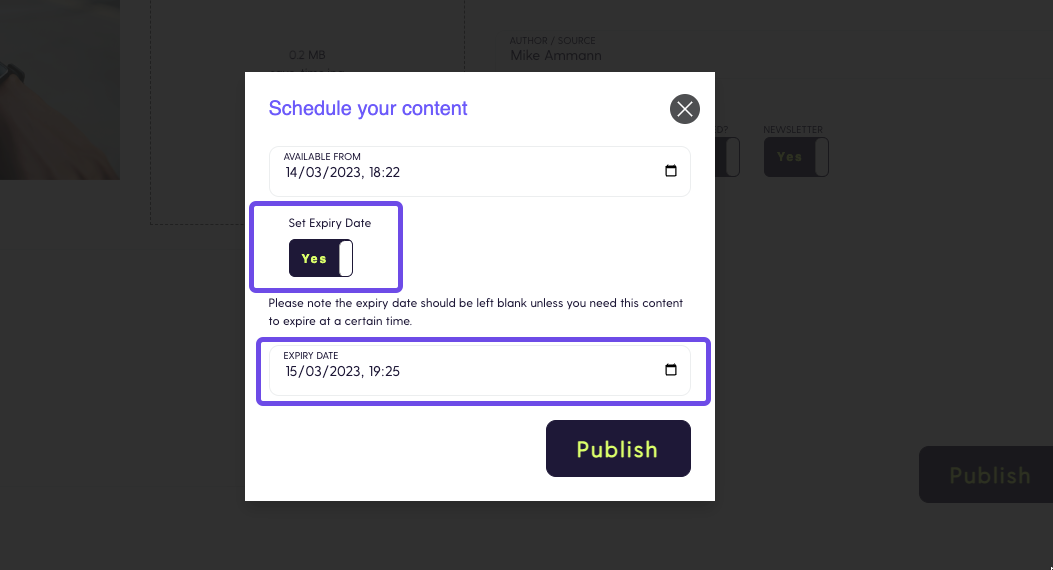
- Check the
Set Expiry Datebox - Select the date you would like the content to expire and therefore no longer be visible in Viewpoint
- Click
Submit for Approval/Publish