Preference Center
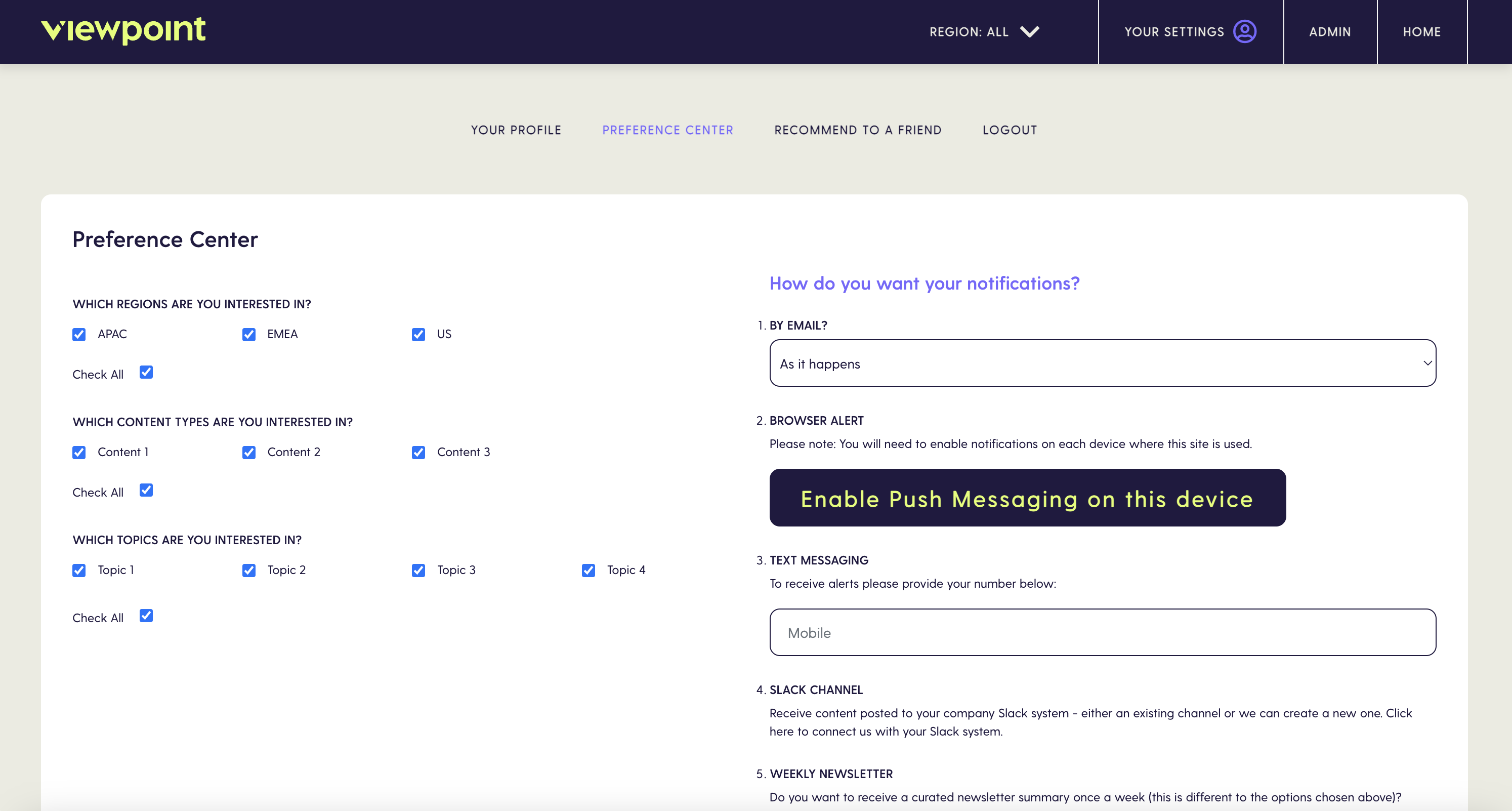
The Preference Center is where both you and your subscribers can set your notification preferences. This controls what, how and when Viewpoint communicates with you.
To access the preference center, got to Your Settings > Profile Center

You can select the types of content and the topics that interest you, along with your notification preferences
Content Tags
You can choose from the topics and content types that interest you most and be notified about content that is published.
For more information on Tags/Filters see Tagging
Notifications
There are a number of options for email:
- Immediate - Content is sent as soon as it is published.
- Daily Update - A daily roundup of all the content that meets the criteria set in your preferences.
- Weekly Update - A weekly roundup of all the content that meets the criteria set in your preferences
Push Notifications
Push notifications allow notifications to be sent directly to both mobile and desktop devices. These notificatons are sent immediately when publishing content.
To Enable/Disable Push notifications
Click the ‘Enable/Disable Push messaging on this device’ button
Text Messaging (SMS)
You can enter a mobile/cell number to receive SMS notifications. These notifications are sent immediately when publishing content.
To Enable SMS
- Enter the mobile phone/cell number you wish to receive notification on and save you preferences.
To Disable SMS
- Remove the mobile phone/cell number from the SMS field and save your preferences.